
Every month-end, accounting sits and pulls bills from the storefront, reps, vans and online one channel at a time; by the time reconciliation is done it drags into the middle of next month. The work is time-consuming and error-prone. This article points out where the time goes, how to make it faster systematically, and where to start tomorrow.
Why closing is slow
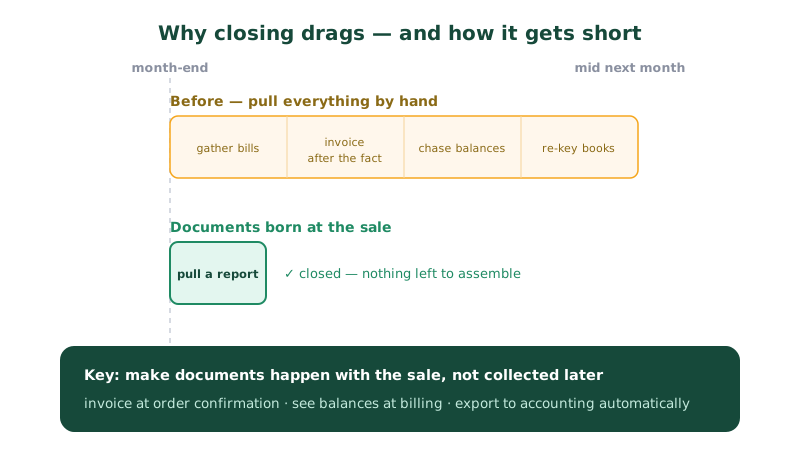
The main cause isn't workload — it's that the data isn't in one place, forcing manual collection and reconciliation:
- Sales bills are in many places — paper, Excel, LINE chats and online channels.
- Tax invoices issued later by hand, making document numbers and totals non-sequential.
- Customer outstanding balances aren't updated, requiring a check one customer at a time.
- Data re-keyed into accounting software again, adding both time and chances for error.
Issue tax invoices at order confirmation
The key to fast closing is making documents happen alongside the sale, not collected afterward. On order confirmation, the system should issue a 7% VAT tax invoice to Revenue Department standards immediately, support credit notes, and number documents sequentially and automatically — continuous numbering with no gaps or duplicates is exactly what the Revenue Department checks, and exactly what hand-keying breaks most often.
When every bill is recorded correctly at the source, there's nothing to "pull together" at month-end — the data is complete and reconciles instantly.
Complete documents and reports in one place, cut re-keying
Another time-sink is accounting pulling bills from many channels and retyping them. A good system should keep tax invoices and a sales–tax summary in one complete set of reports the accounting team can post from directly, so they don't gather from each channel and retype line by line — cutting both time and errors, and keeping the sales side and the books always in agreement.
See the outstanding balance before the next bill (and age it)
A problem that comes with closing is overdue receivables. If the system checks the credit limit and shows the outstanding balance at billing time, it stops balances ballooning at the source. Pair it with an AR aging report — split into 0–30, 31–60 and over-60 days, simply "who owes, and how long" — so you know who to chase first and the receivables picture at month-end fits on one page. (Go deeper on credit and collections in chasing wholesale payments and controlling credit.)
Where to start (you can do this tomorrow)
No system change needed to start shortening the close:
- Note the date you finished closing last month as a baseline, then measure whether next month is faster — you can't tell it's improving without it.
- List how many channels bills come from and how complete each one's documents are — the channels you chase later are what slows you; fix them one at a time.
- Issue invoices at the point of sale wherever possible instead of batching them later; start with the easiest channel.
- Build an AR aging report even in Excel — split 0–30 / 31–60 / over-60 days and you'll see instantly whose money is tied up.
Summary
Slow closing comes from scattered data and after-the-fact documents. Fix it by issuing tax invoices at order confirmation, keeping documents and reports complete in one place to cut re-keying, and controlling balances with AR aging from the point of billing. Start tomorrow by timing your close and tracing which channel slows it. When everything is correct at the source, month-end closing becomes just pulling a report.