
Once you decide to bring in a system to help run distribution, the next question is "which one?" The market has plenty, from big ERPs to specialized apps. This article gathers the key checklist wholesalers and distributors should consider — plus the questions to actually ask vendors — before signing with anyone. (Still torn between ERP and DMS? Read how a DMS differs from an ERP first.)
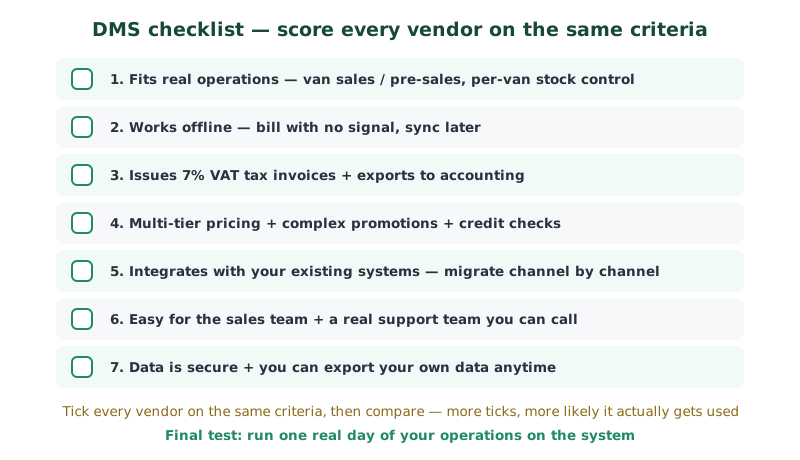
1. Does it support your real operations?
The best system isn't the one with the most features — it's the one that fits how you work. If you run vans, ask whether it genuinely supports van sales, controls each van's stock separately, and reconciles at day's end. If you have field reps, can they bill from a phone on-site? Beware a vague "yes, supported" — ask to see the actual screen for that task.
2. Does it work offline?
Signal on the ground isn't always good. The rep and van side should open bills and record deliveries even with no internet, then sync back once online — otherwise the sales team gets stuck every time they enter a dead zone.
3. Correct tax invoices, ready for your accounting
Check that it issues 7% VAT tax invoices to Revenue Department standards automatically, supports credit notes, and produces sales–tax reports for the accounting software you already use to post from — to cut re-keying and speed up closing.
4. Multi-tier pricing and complex promotions
Wholesale businesses often have prices by customer segment or purchase volume, and various promotions. The system should set segment/volume pricing and attach promotions — buy-X-get-Y, tiered, or time-based — without opening Excel to calculate, and check the credit limit before billing.
5. Integration with your existing systems
If you already have accounting software or other systems, the new one should integrate rather than force you to scrap everything. Moving one channel at a time is safer than changing everything at once.
6. The sales team can actually use it, with real support
No matter how capable the system, it achieves nothing if the sales team can't use it. The rep/van screens should be minimal-tap and easy to understand, and crucially there should be a real support team you can call — not leaving you to trial and error.
7. Data is secure and you own it
Ask clearly whether each company's data is isolated, encrypted and auto-backed up — and most importantly, whether you can export your own data anytime. Business data should always be yours, not held hostage when you want to switch vendors.
Where to start (you can do this tomorrow)
Turn the checklist into a real selection process, not just reading:
- Write one real day of operations as steps (load van → bill a credit customer → issue an invoice → close the van at day's end → view a report) and use it as the same test for every vendor.
- Turn the 7 points above into a scorecard table and rate every vendor on the same criteria, so you don't get dazzled by features you won't use.
- Ask for a demo with your own store's data, not their sample case — real data surfaces the snags a polished demo hides.
- Ask the total cost over one year — setup, monthly per-user, training, data migration — not just the entry price.
- Talk to the support team before signing — actually call or chat and see if they respond fast and understand wholesale.
Summary
Choose a DMS based mainly on your real operations: supports vans and reps, works offline, issues tax invoices and produces reports your accounting can use, sets multi-tier pricing, integrates with existing systems, is easy to use with a support team, and keeps your data yours. Turn these seven into a scorecard, rate every vendor the same way, then finish by running one real day on the system. Tick this checklist and the odds it actually gets used and pays off go way up.