
Many wholesale owners start by looking for generic "selling software," then find that retail POS hits a wall in wholesale work — no tiered pricing, no credit terms, no multi-warehouse control. This article sums up what wholesale software that actually works must include, before you buy.
How wholesale differs from retail
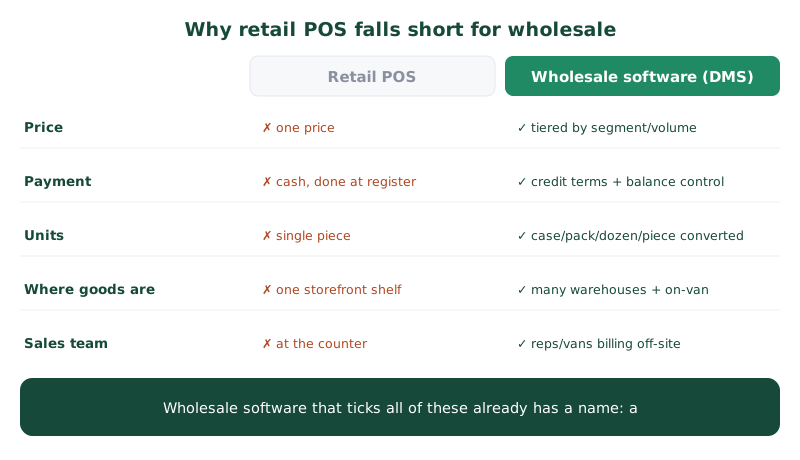
The reason ordinary POS isn't enough is that wholesale differs from retail in several ways:
- There isn't one price — each customer, segment or purchase volume gets a different price.
- Selling on credit is normal — you must control credit terms and outstanding balances per customer, not cash-and-done at the register.
- Orders are bulk, in multiple units — cases, packs, dozens or pieces; the system must convert units and deduct stock correctly.
- Goods live in many places — multiple warehouses, on vans, and on consignment — not one storefront shelf.
- There's a sales team outside the store — field reps and vans billing on-site, not at a counter.
Functions wholesale software must have
- Real-time multi-warehouse stock — see on-hand quantities across warehouses and vans, with every bill deducting real stock instantly.
- Per-segment/volume pricing + promotions — tiered prices with buy-X-get-Y and stepped discounts, calculated by the system.
- Credit terms and balances — check the credit limit and see old balances at billing time, not when chasing payment later.
- 7% VAT tax invoices — issued to Revenue Department standards automatically, with continuous numbering and credit notes.
- Multiple units of measure — case/pack/piece converted correctly for both selling and stock deduction.
- Multichannel order capture — LINE, reps, phone and a B2B portal into one system with no re-keying.
If you run vans or field reps, look further
Wholesalers with vans or field reps need more than storefront software: billing from a phone on-site, working offline with no signal, per-van stock control, and proof of delivery (POD) with photos or signatures. This group of functions is the line between storefront software and a system that genuinely controls distribution.
Complete wholesale software is, in fact, a DMS
If you tick nearly every box above, what you're really looking for already has a name: a Distribution Management System (DMS) — built specifically for wholesale work, covering order capture, stock control and van sales through to tax invoices and reports for your accounting.
Where to start (you can do this tomorrow)
Before spending on any software, do these four things first:
- List the functions you actually use, separate from the ones you'd like — make the daily ones your core criteria so you don't overpay for what you'll never touch.
- Take your most complex bill and try issuing it on the system — a credit customer on a special price, ordering cases mixed with pieces. If it flows, the system can handle your real work.
- Plan to migrate channel by channel — start with the one that hurts most (stock or vans); you don't have to rip everything out at once.
- Verify it really produces tax invoices and sales–tax reports your accounting can post from — ask to see real sample documents/reports once, not just hear "yes, it can."
Summary
Workable wholesale software must support tiered pricing, credit terms, multi-warehouse stock, multiple units, tax invoices and an outside sales team — things ordinary retail POS can't provide. Start tomorrow by trying your most complex bill and planning a channel-by-channel migration. If your business has outgrown storefront software, a DMS is the more on-target answer — read on at the checklist for choosing a DMS.